Less chaos. More structure. One platform.
No more scattered software or processes — with five core building blocks you're assured of one shared operational structure that drives your organisation forward.
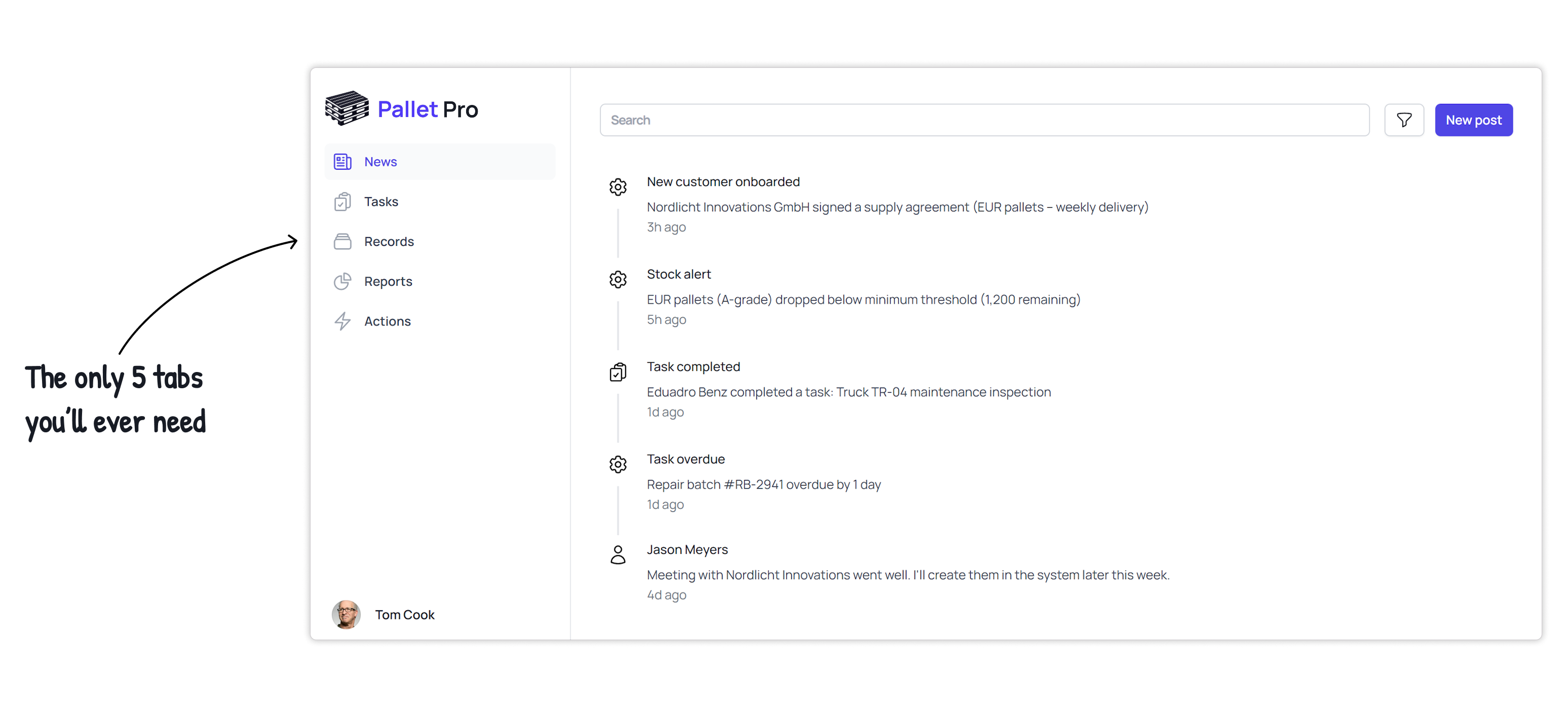
We believe better operations come from better structure
Most businesses don't struggle because of missing tools, they struggle because their work is scattered across too many of them — let's fix that.
Every business can be reduced to five simple building blocks.
No matter the industry or company size, internal work always falls into the same categories. When these live together in one system, work becomes visible, connected, and improvable.
A shared operational structure reduces data silos, removes fragmentation, and turns scattered tools and workflows into a system people understand and trust.
These are the five building blocks we believe in:
News — Things people need to know
Events, updates, or signals — generated by people or processes.
When important information is scattered across inboxes and chat tools, it gets missed or ignored. Centralised news keeps everyone aligned without creating noise.
Examples:
-
- New client onboarding completed
Nordlicht Innovations HmbH signed a delivery contract (EUR pallets — weekly delivery)
-
- Stock alert
EUR pallets (A-grade) dropped below minimum threshold (1,200 remaining)
-
- Task completed
Eduardo Benz completed a task: Maintenance inspection Truck TR-04
-
- Task overdue
Repair batch #RB-2941 one day overdue
-
- Jason Meyers
Meeting with Nordlicht Innovations went well. I'll add them to the system later this week.
News — Things people need to know
Events, updates, or signals — generated by people or processes.
When important information is scattered across inboxes and chat tools, it gets missed or ignored. Centralised news keeps everyone aligned without creating noise.
Examples:
-
- New client onboarding completed
Nordlicht Innovations HmbH signed a delivery contract (EUR pallets — weekly delivery)
-
- Stock alert
EUR pallets (A-grade) dropped below minimum threshold (1,200 remaining)
-
- Task completed
Eduardo Benz completed a task: Maintenance inspection Truck TR-04
-
- Task overdue
Repair batch #RB-2941 one day overdue
-
- Jason Meyers
Meeting with Nordlicht Innovations went well. I'll add them to the system later this week.
Tasks — Things people need to do
Work that requires attention or action — assigned to a person or group.
Tasks disconnected from the data they affect create confusion. When tasks are linked to records and actions, work becomes clear and accountable.
Examples:
-
- Inspect returned pallets Completed
Scheduled for: Today
-
- Schedule repair In progress
Scheduled for: Tomorrow
-
- Confirm pickup date with client In progress
Scheduled for: 25 March 2026
-
- Book vehicle maintenance In progress
Scheduled for: 7 June 2026
-
- Check inventory Archived
Scheduled for: 10 June 2026
Records — Things the business keeps track of
Entities that represent reality inside the business.
Records are the backbone of every business. When they live in multiple tools, no report can be trusted and no process is fully visible.
Examples:
-
- Customers
Manage customer information
-
- Pallet types
Manage pallet types
-
- Repair batches
Pallet batches that need to be repaired
-
- Vehicles
All information about the vehicles we own
-
- Equipment
All information about the equipment we own
-
- Locations
The various locations where work can be performed or items can be placed
Reports — Things that show what's going on
Structured views on the state of the business.
Good reports aren't surprising — they confirm what's happening. Reliable reports are only possible when news, tasks, records, and actions are connected.
Examples:
-
- Current pallet inventory
By type and quality
-
- Repair throughput report
Repaired vs. rejected pallets
-
- Vehicle utilisation report
Vehicle usage and downtime
-
- Delivery performance report
On-time vs. delayed deliveries
-
- Customer volume report
Pallets purchased/sold per customer
-
- Equipment maintenance overview
Upcoming and overdue maintenance
Actions — Things that start new processes and change records
Actions are where new processes are started and where work actually happens.
Without clear actions, work becomes invisible. Actions create traceability, accountability, and clean data.
Examples:
-
- Create new customer
Start a new customer onboarding process
-
- Register pallet intake
Start a new pallet intake process
-
- Create repair batch
Start a new repair batch process
-
- Schedule a delivery or pickup
Start a new delivery or pickup process
-
- Adjust inventory levels
Start a new bulk inventory adjustment process
Curious what a simpler operational structure could look like?
How it works: an example
Below you can see how the ‘Register Repair Batch’ process flows through the five core building blocks of Operandi One.

Actions
Warehouse manager starts the process.
Records
Batch ID, pallet type, quantity and priority stored.
Status changed to "Completed".
Tasks
Task automatically assigned to Eduardo Benz.
Technician marks the task as done.
News
Internal update visible to warehouse and logistics teams.
Team notified that pallets are ready for use.
Reports
Metrics such as repair time and volume refreshed.
Operandi One gives your business a structured operational foundation to start simple and evolve it over time as your processes and systems come into focus.
- User and Permission management.
-
Operandi One includes built-in user, permission and group management from day one. Administrators can create users, define groups, and control access across the platform, with every custom feature designed to respect these permissions by default.
- Tasks and internal news
-
are built into the core platform. Users can create tasks, assign them to individuals or groups, and post updates to keep everyone informed. Custom features automatically use this same structure, allowing processes to generate tasks and news when action or attention is required.
- One place to request new features.
-
Administrative users can request new features directly from within the platform. Each request is reviewed with you to clarify the goal and desired outcome, after which the feature is designed, built, and integrated into News, Tasks, Records, Reports, and Actions. Once tested, it is deployed seamlessly to your environment.
Frequently asked questions
-
That's not a problem. Operandi One is designed to work with your existing systems and data sources. If your data is located in another database or external system, we will help you find a way to make this data visible and usable within Operandi One, or to fully migrate the data into your Operandi One environment. We do this by examining which existing integrations are already available, or whether custom development is needed to achieve the desired result, ensuring that your existing data integrates smoothly with the five building blocks (News, Tasks, Records, Reports, Actions) of Operandi One.
-
A standard subscription includes up to 15 user licences. If you need more than 15 users, we'll discuss your requirements and suggest a suitable option based on your organisation's size and needs.
-
Administrative users can request new features directly from within the portal. Simply head over to the Actions tab and select the 'Request a feature' Action, or click any of the 'Request a feature' buttons on any of the other pages inside the portal. If you don't see any of these buttons, you might not have the required permission and can therefore reach out to an administrator or to us directly.
-
All data in your Operandi One environment is stored in secure, European datacenters located in Amsterdam, Paris or Warsaw — fully compliant with GDPR and European data protection law. Any existing data you hold elsewhere, and have not chosen to migrate to Operandi One, stays exactly where it is. We never move or access your data without your knowledge.
Ready to get a grip on your business processes?
We're confident you'll enjoy the Operandi One way of thinking once it's in place. Our focus on simplicity and structure helps teams gain clarity fast — and most customers start seeing real benefits within the first month of activating a new feature.
Start your journey by answering 3 simple questions via the 'Get started' button below, or reaching out with any questions. We'll get back to you within 24 hours.
Let's talk
Send us your questions or request a demo and we'll get back to you within 24 hours.